
Wholesale Listing Structure That Converts: The 7 Content Blocks B2B Buyers Scan First

B2B buyers do not read wholesale listings the way consumers do. They scan for fast signals that answer three questions:
- Can this product sell in my channel
- Can this supplier deliver consistently at scale
- Can I safely describe the product without compliance risk
A high-converting wholesale listing is not a long brochure. It is a structured decision page that surfaces the right information early, then provides rollout clarity for samples, customization, and repeat orders.
Below are seven content blocks that B2B buyers typically scan first, with practical text structures you can reuse across OEM and ODM wearable programs.
Request a Quote | Download Catalog
1. Title and One Sentence Positioning
This block sets the product role in a catalog. It should combine model name, form factor, channel fit, and one primary hook.
Title format
Brand or model plus category plus channel fit plus OEM or ODM
One sentence positioning format
A short sentence that states who it is for and what makes it different
Example title line
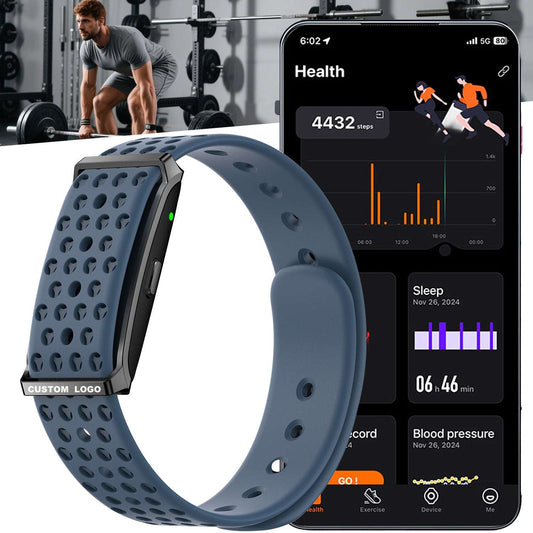
Screenless Fitness Tracker OEM for Bulk Programs and Distributor Catalogs
Example one sentence positioning
A screenless band built for long-wear adoption with app-based trend review and low maintenance for bulk rollouts.
Keep one primary hook only. Do not stack multiple narratives in the first sentence.
2. Hero Proof Bar: Three Proof Points Plus One Compliance Line
B2B buyers want proof points they can reuse as icons on sell sheets, catalog pages, and partner product pages. Keep it to three, so the message stays crisp.
Proof point structure
- Form factor or differentiator
- One performance signal
- One operational signal
Wearable-friendly proof point examples
- Screenless design
- IP rating or waterproof rating
- Sport modes count
- Battery positioning statement
- App ecosystem name
Add one compliance line that can be copied across channels. It should be short and consistent.
Compliance line example for wellness wearables
Health metrics are for wellness reference only and not intended for medical diagnosis.
If the product includes recording, add a second short line for consent. Use the same wording across listing, insert, and manual.
Recording line example
Audio recording use should follow local laws and consent requirements.
This block reduces partner-side rework and keeps messaging consistent.
3. Channel Fit and Buyer Use Cases
This block answers who the product is for and where it sells. Keep it concrete. Buyers want to map the SKU to a shelf or a category page.
Use case structure
- Best-fit channels
- Typical buyer programs
- Product role in a ladder
Example for screenless wearables
Best-fit channels
- corporate wellness programs
- distributor catalogs
- lifestyle and athleisure assortments
- bulk promotional projects
Typical programs
- long-wear wellness tracking initiatives
- low support burden deployments
- multi-SKU catalog expansion without platform changes
Product role in a ladder
- core volume model
- outdoor identity model
- premium insight upgrade
- differentiated utility SKU
This section should help a buyer decide where the SKU sits relative to other models, not just what it does.
4. Core Story and Workflow: What the User Actually Does
Many wholesale listings fail because they only list features. B2B buyers also need to know the workflow that customers will experience, because workflow drives returns, reviews, and support tickets.
Workflow structure for most wearables
- wear the device
- pair with the app
- sync data
- review dashboards and trends
- receive reminders and alerts
Example workflow paragraph
Users wear the band throughout the day and sync to the companion app for dashboards, history, and trend views. The wrist experience stays simple, while the app handles records, summaries, and reporting pages.
If a product has a special hook, describe it as a workflow, not as a buzzword.
Example for a recording wearable
Users record a short voice memo on the device, sync to the app, then review and manage files on the phone. The wrist stays discreet and screenless.
When buyers understand workflow, they can write better listings and reduce expectation mismatch.
5. Decision Signal Specs: The Short Procurement Snapshot
This block is not a full datasheet. It is a shortlist of decision signals that procurement uses to confirm fit.
Decision signal structure
- App and OS compatibility
- Battery and charging type
- Protection rating
- Sport modes count
- Key differentiator features
- Certifications available
Example snapshot format
- App ecosystem and OS requirements
- Battery capacity and usage positioning
- Charging method
- Protection rating
- Sport modes count
- Core feature highlights
- Certifications listed
Avoid long chip and sensor lists in the main listing page unless your audience is engineering-led. Those details belong in a downloadable catalog or specification sheet.
If you include endurance claims, keep them in typical-use language and state usage dependence. This reduces disputes.
6. OEM and ODM Scope: What Can Be Customized and What Stays Stable
This block is where B2B buyers evaluate whether the supplier can support a program, not just ship a product.
Customization categories that buyers scan for
- branding: device logo, packaging, inserts, manuals
- appearance: strap colorways, strap materials where available, buckle finishes
- localization: languages, unit settings, labeling
- program configuration: feature exposure and wording alignment if applicable
- repeat order stability: version control and consistency planning
A clear listing makes it obvious what changes are cosmetic and what changes affect platform behavior. That clarity is important for multi-SKU catalogs.
Example structure
What commonly changes
- strap colorways and textures
- packaging tier and inserts
- logo placement zones
- manual and labeling sets
What stays stable
- core app experience
- platform workflow
- primary feature set for the selected configuration
This section should reduce ambiguity and shorten the RFQ cycle.
7. Sampling and Rollout: How Buyers Verify Before Bulk Orders
For B2B, a good listing includes a verification path. That path reduces risk and signals that the supplier understands deployment realities.
Sampling structure
- what to verify in hardware feel
- what to verify in app workflow
- what to verify in claims alignment
- what to verify for repeat orders
Sampling checklist examples for wearables
Hardware and wearing comfort
- strap edge comfort and fit range
- comfort in long wear and sleep wear
- charging docking stability and contact consistency
App workflow
- pairing speed and reconnect behavior
- sync continuity and dashboard consistency
- record history behavior for sleep, sport, and trends
Feature pages
- clarity of trend views for heart rate and SpO2
- sleep summaries and labels
- advanced pages such as HRV or ECG where included
Claims alignment
- battery wording matches the tested profile
- protection rating messaging matches intended scenarios
- wellness reference language is consistent across listing and insert
Rollout readiness
- onboarding insert content and QR pairing guidance
- language requirements confirmed
- firmware and app version stability planning for repeat shipments where applicable
End this block with a direct RFQ call to action and a short RFQ input list. Buyers want to know what information is needed for pricing and lead time.
RFQ inputs that speed up quoting
- target channel and market
- expected quantity and timeline
- branding and packaging scope
- language requirements
- any compliance copy requirements for your channel
Recommended Page Order for Shopify Wholesale Listings
A clean order for Shopify pages follows the scan pattern:
1 Title and one sentence positioning
2 Hero proof bar plus compliance line
3 Channel fit and use cases
4 Workflow and user experience
5 Procurement snapshot
6 OEM and ODM scope
7 Sampling plan and RFQ inputs
This structure keeps the page readable, reusable, and procurement-friendly.