
Distributor Training Script: How to Explain Screenless + App‑First Products to End Customers

Screenless Wearables OEM/ODM | Distributor Sales Enablement | Fewer Misunderstandings | Better Reviews
Screenless wearables sell well in bulk programs because they are comfortable, low distraction, and easy to maintain. But they also have one predictable failure point: if an end customer thinks the product should behave like a smartwatch, confusion follows. Confusion leads to returns, negative reviews, and support tickets that distributors must handle.
A short, repeatable sales script solves this. The goal is not to teach sensors. The goal is to teach the routine in 30 seconds:
“Wear it daily. Sync to the app. Review your dashboards and records on the phone.”
This article provides a distributor-friendly training script and copy blocks you can reuse across product pages, sales calls, chat support, and in-box quick-start cards.
BROWSE OUR WORK
Explore our screenless lineup for distributor and private label programs.
Request a Quote | Download Catalog
1) The Core Message (One Sentence)
Every screenless product needs one sentence that is repeated everywhere:
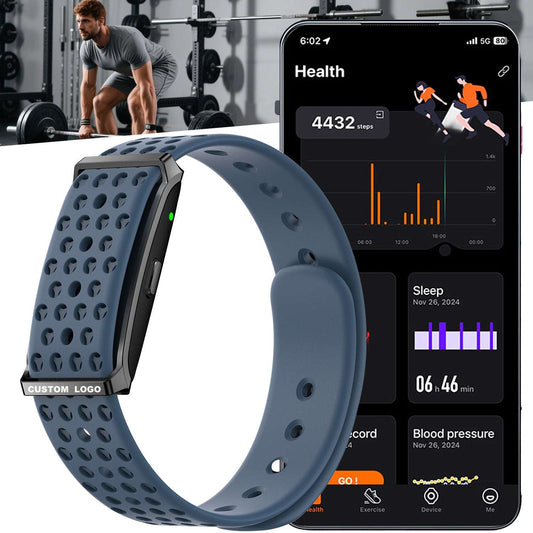
“This is a screenless, app-first wearable. You wear it continuously and view your data in the app.”
If you want to reduce returns, this sentence belongs in:
- the first lines of the product listing
- the catalog card
- the quick-start insert
- the chat support response
- the FAQ
Consistency matters more than extra features.
2) 30‑Second Sales Script (For Store Staff and Sales Calls)
Use this script exactly as written. It works because it sets expectations and creates a simple routine.
Script
“Think of this as a wearable sensor band, not a smartwatch. There’s no full screen on the wrist. You wear it all day and at night, then you open the app to see your heart rate, sleep, and activity trends. It’s designed to be low distraction and low maintenance, so it’s easier to keep wearing every day.”
Optional add-on line
“Because there’s no big display, battery life is typically longer and the band feels lighter on the wrist.”
3) 10‑Second Script (For Product Cards and Catalog Pages)
Sometimes you only get one line. Use one of these:
- “Screenless band. View dashboards and records in the app.”
- “Wear daily, sync to the app, review trends on your phone.”
- “Minimal on the wrist. Full tracking in the app.”
Pick one and use it everywhere.
4) The 5 Questions End Customers Ask (And the Best Answers)
These questions appear in almost every channel. Give sales teams standard answers.
Q1: “Where is the screen?”
Answer: “It’s screenless by design. You view your dashboards in the app.”
Q2: “How do I see my heart rate and sleep?”
Answer: “Wear the band, then sync to the app. The app shows trend charts and history.”
Q3: “Is it still accurate without a screen?”
Answer: “The display is not where the measurement happens. The band collects data, and the app displays it.”
Q4: “Can it track workouts?”
Answer: “Yes. Workout records are shown in the app.”
Q5: “How often do I charge it?”
Answer: “It’s designed for low maintenance. Charging routine depends on use, notifications, and settings.”
These answers reduce the most common misunderstandings that cause returns.
5) “App‑First Routine” Training (The 4 Steps to Teach)
Screenless wearables succeed when users learn the routine:
- Download the app
- Pair the device
- Wear daily
- Sync and review dashboards
If a distributor trains only one thing, it should be this routine.
6) Product Page Copy Blocks (Ready to Paste)
Distributors and partners need reusable copy. Here are blocks you can paste into listings.
A) First two lines of the listing
“Screenless wearable band with app-first dashboards. Wear daily and sync to view your health and activity trends in the app.”
B) Feature bullets (short)
- Screenless, low-distraction wear
- App dashboards and trend charts
- Sleep and daily wellness tracking
- Workout records in the app
- Long battery routine
C) Battery line (safe positioning)
“Battery performance varies with settings, syncing, and notification use.”
D) Water resistance line (daily routine positioning)
“Designed for daily wear water resistance.”
These blocks keep the message consistent and reduce support questions.
7) In‑Box Quick‑Start Card Script (Minimal Version)
If you ship screenless products, the insert card should prevent the top two return reasons: “I thought it had a screen” and “I don’t know where to see data.”
Front side
- “Scan QR to download the app.”
- “Pair the band in the app.”
- “Wear daily and sync to view dashboards.”
Back side
- “Screenless design. View data in the app.”
- “Charge with the magnetic charger.”
- “Do not use while charging.”
This insert saves distributors support time at scale.
8) How to Sell Screenless as a Benefit (Not a Missing Feature)
Sales teams should frame screenless as a positive:
- “Less distraction”
- “No screen glare at night”
- “Cleaner look, more like an accessory”
- “App-based trend charts are easier to read on a phone”
- “Lower maintenance routine”
This is important because end customers often interpret “no screen” as “less value” unless the benefit is explained.
9) Distributor Checklist: Where to Place the Script
A training script only works when it is repeated across touchpoints:
- catalog card headline
- product page first lines
- product page bullets
- FAQ section
- quick-start insert card
- chat support macro
- customer service email template
If every reseller uses a different explanation, returns increase. If every reseller uses the same explanation, expectations stabilize.
10) Certifications and Documentation (B2B Note)
Certification documentation varies by model and target market. Final labeling and compliance requirements may vary by destination country and channel policy.
FAQs
10 FAQs for Distributor Training on Screenless Wearables
-
What is the simplest way to explain a screenless wearable?
“It’s app-first. You wear it daily and view dashboards in the app.” -
Why do screenless products convert well in bulk programs?
They support a clean wrist look, low distraction, and a low-maintenance routine. -
What is the #1 return reason for screenless products?
Customers believe it should have a screen or smartwatch behavior. -
What should be in the first line of every listing?
“Screenless, app-first dashboard.” -
How do users check their data?
By syncing to the app and viewing dashboards and trend charts. -
Can screenless products track workouts?
Yes. Workout records are viewed in the app. -
Do screenless products reduce support tickets?
They reduce on-device UI confusion, but only if the app-first routine is explained clearly. -
Do we need a quick-start insert card?
Yes. It prevents the most common misunderstanding and improves first-week activation. -
Is the health data medical-grade?
No. Health data is for wellness reference only and not intended for medical diagnosis. -
Can this script be used across multiple SKUs?
Yes. The routine is the same across screenless models, so one script can support multi-SKU catalogs.