
Return Reduction Guide for Wearables: Top 12 Misunderstandings and How to Prevent Them

Returns in wearable programs are rarely caused by one single defect. They are usually triggered by misunderstandings between what the buyer expected and what the product actually delivers in daily use. For distributors and private label operators, the most cost-effective way to reduce returns is to control expectations through consistent listing copy, onboarding inserts, and sampling verification.
This guide lists twelve common misunderstandings that repeatedly drive returns, and the prevention actions that B2B teams can apply across product pages, catalog copy, packaging inserts, and customer support scripts.
Request a Quote | Download Catalog
1) Battery life is a guarantee for every user
Misunderstanding
Buyers read one battery number as a guaranteed result for all users, regardless of settings.
Why it creates returns
Users enable frequent monitoring, notifications, or GPS-related workflows and get shorter endurance than expected.
Prevention actions
- Use a defined usage profile in your listing copy
- Keep battery statements in typical use language
- Keep the same battery sentence across product page, insert, and manual
Copy template
Battery life is based on typical usage. Actual endurance varies by settings, notifications, and usage habits.
2) Waterproof rating means unlimited water use
Misunderstanding
Users assume IP ratings and ATM ratings mean any water activity is safe.
Why it creates returns
Water exposure complaints escalate quickly and are difficult to verify. Channel conflict increases when the listing implies more than the rating supports.
Prevention actions
- State the rating only and describe daily-use scenarios
- Align channel copy with your user guide wording
- Keep packaging copy consistent with the listing
Copy template
Rated for daily wear scenarios consistent with the stated protection rating. Follow the user guide for care and usage scenarios.
3) All health metrics are medical-grade
Misunderstanding
Users treat wellness metrics as clinical diagnostics.
Why it creates returns
Users compare results against professional devices and claim the product is inaccurate.
Prevention actions
- Use one consistent compliance line across channels
- Avoid medical language such as diagnose, treat, prevent, clinical-grade
- Train partner pages to use wellness reference and trend wording
Standard compliance line
Health metrics are for wellness reference only and not intended for medical diagnosis.
4) Blood pressure and blood glucose features are direct measurements
Misunderstanding
Users interpret blood pressure and blood glucose pages as direct measurement tools.
Why it creates returns
These pages are commonly presented as reference or trend views and require careful wording.
Prevention actions
- Use reference and trend wording only
- Avoid phrases like measure, test, accurate reading
- Add one sentence in onboarding materials that clarifies reference nature
Copy template
Blood pressure and blood glucose related pages are presented for wellness reference and trend viewing. They are not intended for medical diagnosis.
5) ECG results are a diagnosis
Misunderstanding
Users treat ECG as a medical diagnosis feature.
Why it creates returns
Users try to record ECG while moving, misunderstand posture requirements, or interpret outcomes as clinical decisions.
Prevention actions
- Use ECG recording language rather than diagnostic language
- Provide a short user education insert focused on posture and stillness
- Make sure the app wording is consistent with channel copy
Copy template
ECG supports recording and history review for wellness reference. Follow the app guidance for recording posture and stillness.
6) Screenless devices should behave like smartwatches
Misunderstanding
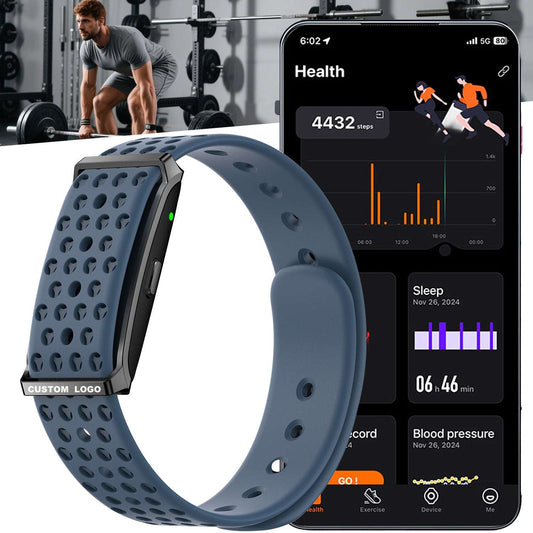
Users expect on-wrist interaction, live dashboards, and full control without opening the app.
Why it creates returns
Screenless devices rely on an app-first workflow, and users may feel the product is incomplete.
Prevention actions
- State the workflow clearly in the first section of the listing
- Use a three-step explanation that reduces confusion
- Align the quick-start insert to the same workflow
Workflow block
Wear the band, sync to the app, review dashboards and history in the app.
7) App sync should be instant and never miss data
Misunderstanding
Users expect continuous, real-time sync with no gaps.
Why it creates returns
Mobile OS permission behavior and background limits can affect sync continuity.
Prevention actions
- Provide an Android and iOS permission guide as a standard support material
- Use clear language for sync rhythm, such as sync daily or sync after workouts
- Validate reconnection behavior on representative phones during sampling
Support line
For stable records, keep Bluetooth enabled and sync regularly through the app. Permission settings may affect background behavior.
8) Notifications will work the same on every phone
Misunderstanding
Users expect identical message and call alerts across all phone brands and OS versions.
Why it creates returns
Notification permissions and OS restrictions vary. Buyers blame the device when the real issue is permission flow.
Prevention actions
- Keep a short permission checklist in the quick-start insert
- Avoid listing copy that implies universal compatibility for every notification type
- Train support to request OS version, phone model, and permission screenshots before approving returns
Support checklist items
Bluetooth permission enabled
Notification access enabled
Background activity allowed for the app
Do not disturb rules checked on phone and app
9) Sport modes count means professional accuracy for every sport
Misunderstanding
High sport mode numbers are interpreted as professional-grade sport analytics.
Why it creates returns
Users expect precise sport-specific metrics and compare against dedicated sports devices.
Prevention actions
- Present sport modes as coverage and categorization rather than lab-level analytics
- Avoid promising professional sport performance unless validated
- Provide a simple statement that sports records are reviewed in the app
Copy template
Multiple sport modes support activity categorization and record review in the app. Results vary by activity type and usage conditions.
10) Straps will fit everyone comfortably with no skin issues
Misunderstanding
Users assume one strap style fits all wrists and skin conditions.
Why it creates returns
Comfort is personal. Irritation, pressure points, or fit dissatisfaction can trigger returns even when the device works.
Prevention actions
- Include strap fit range guidance on the product page
- Validate edge comfort and buckle behavior in sampling
- Offer strap variants as part of the SKU strategy when channels require different comfort directions
Support line
Comfort can vary by wrist size and wearing habit. Fit adjustment and correct positioning improve long-wear comfort.
11) Magnetic charging will always attach perfectly
Misunderstanding
Users assume magnetic chargers are effortless and never disconnect.
Why it creates returns
If docking alignment is sensitive or contacts get contaminated, users report charging failures.
Prevention actions
- Include a clear charging alignment photo in packaging inserts
- Validate docking repeatability across multiple units during sampling
- Keep spare chargers available for distributor service stock where applicable
Support line
Keep charging contacts clean and align the charger to the contact points. Charging behavior depends on correct docking.
12) Remote sharing and advanced reports are automatic and universal
Misunderstanding
Users expect remote sharing, AI reports, or advanced dashboards to work the same in every region and configuration.
Why it creates returns
Some functions can be configuration dependent or app-version dependent, and user education must match what is enabled.
Prevention actions
- Use configuration dependent language for advanced pages that vary by program
- Ensure partner pages do not promise features outside the enabled scope
- Validate report wording and dashboard tiles during sampling, then lock the copy
Copy template
Advanced dashboards and report pages depend on the selected configuration and app version. Position these features as wellness insights rather than clinical outputs.
A Simple Return Reduction Pack for Distributors
A return reduction pack is a small set of materials that keeps expectations aligned across every partner listing.
Minimum pack items
- One sentence positioning line
- Five listing bullets
- One compliance line for wellness reference
- Battery statement with defined usage profile
- Waterproof rating statement with scenario wording
- Quick-start card showing the app workflow
- Android and iOS permission checklist
- Charging alignment photo and one-line instruction
When these blocks are consistent across product pages, packaging inserts, and partner catalogs, returns drop because misunderstandings drop.
Sampling Focus That Prevents Return Drivers
Sampling reduces returns when it verifies the real workflow and the real wording.
Sampling verification priorities
- Comfort and fit across representative users
- Charging docking repeatability across multiple units
- Pairing and reconnection behavior on representative phones
- Sync continuity over several days, including sleep and sport records
- App page wording and labels for ECG, HRV, blood pressure trend, and glucose reference pages
- Notification permission flow on Android and iOS
- Packaging insert clarity for first-time users
RFQ Inputs That Help Reduce Returns Before Launch
- Target market and channel type
- Quantity and timeline
- App ecosystem requirement
- Packaging tier and insert language requirements
- Waterproof and battery messaging rules required by the channel
- Whether ECG, blood pressure trend, glucose reference, recording, or remote sharing features will be emphasized
- Support language requirements and after-sales handling preference