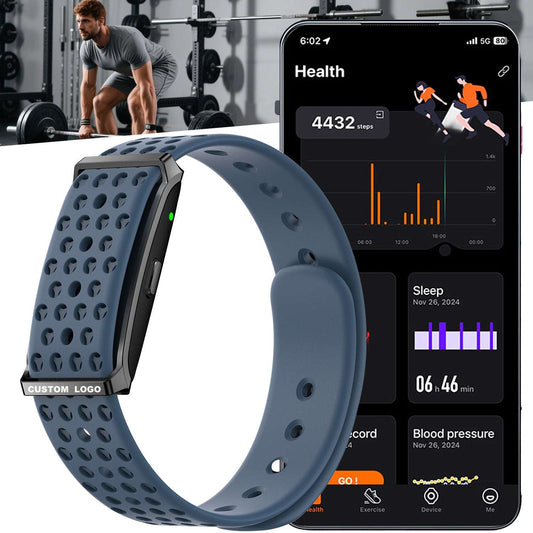

How to Solve "Fitness App Not Tracking" Issues for Your Business
For any business in the wearable space, customer reports of a fitness app not tracking data accurately can quickly damage your hard-earned reputation. Problems like a fitness tracker not syncing, steps disappearing, or heart rate readings lagging create frustration and erode trust in your brand.
As a manufacturer specializing in screen-free fitness trackers for B2B brands, we’ve helped countless partners navigate these technical challenges. The issue isn’t always just software—it often starts with the hardware foundation. Let’s explore the real reasons behind these failures and the practical steps you can take to resolve them.
Where Do “Fitness App Not Tracking” Problems Really Come From?

When data stops flowing between the tracker and the app, the cause usually falls into one of three areas:
1.The Connection is Broken
The most common complaint is a fitness tracker not syncing. This is almost always a Bluetooth issue. Low battery, distance from the phone, interference from other devices, or simply a weak Bluetooth module in the tracker can cause the connection to drop, leaving your customer’s data stuck on the device.
2.The App is Blocked
Sometimes, the tracker is working, but the phone won’t let it communicate. If location services, physical activity permissions, or background app refresh are disabled, data can’t flow. An outdated app version or an old phone operating system can also build a wall between the device and your software.
3.The Hardware Isn’t Up to the TasK
This is the most critical factor for brand owners. Inexpensive, low-quality sensors produce unreliable data. A poor accelerometer miscounts steps. A basic heart rate sensor is easily thrown off by movement or fit. If the hardware foundation is weak, your app will always struggle to deliver accurate results, no matter how good your code is.
The Business Case for Screen-Free Tracker Design
In our work with B2B clients, we’ve found that choosing a screen-free design isn’t just about cost—it’s a strategic decision for reliability. Here’s why:
- Stability Over Features:Without a power-draining display, the device’s energy is dedicated to two things: maintaining a rock-solid Bluetooth connection and running high-quality sensors. This directly tackles the main causes of sync failures and inaccurate data.
- Longer Battery, Fewer Problems: A tracker that lasts 7+ days on a charge is far less likely to die mid-workout and lose sync. Customers aren’t constantly recharging, which means the connection to your app remains active and reliable.
- Focus on Your Brand’s App: A screen-free device makes your branded app the center of the user experience. This strengthens your relationship with the customer and gives you complete control over how data is presented and acted upon.
Choosing the Right Hardware for Your App

When evaluating a tracker for your brand, ask your supplier these questions:
- For Connectivity: What Bluetooth chipset do you use? Can you share data on connection stability and drop-off rates?
- For Data Accuracy: Can you provide test reports for sensor accuracy (steps, heart rate)? What is your process for calibrating sensors?
- For Long-Term Performance: How do you manage firmware updates to ensure ongoing compatibility with mobile operating systems?
A Clear Action Plan to Fix Sync Issues
Equip your customer support with this straightforward guide to troubleshoot the most common problems:
- Restart Everything: Have the user restart both their fitness tracker and their smartphone. This simple step fixes many temporary glitches.
- Re-pair the Device: Guide them to turn phone Bluetooth off and on, remove the old pairing from their phone’s Bluetooth list, and reconnect the device through your official app.
- Check Permissions: Provide clear instructions (screenshots help) for enabling Location, Physical Activity, and Background App Refresh permissions for your app.
- Update All Software: Ensure your app, the tracker’s firmware, and the user’s phone OS are all running the latest versions.
FAQ for Brands and Resellers
Why choose a screen-free tracker for our OEM/ODM project?
Screen-free trackers reduce the most common points of failure—battery life and sync issues—leading to fewer customer support tickets and higher satisfaction. They also offer a lower unit cost and ensure users consistently engage with your branded app.
How does your manufacturing process help prevent these app issues?
Our focus is solely on the core components that affect data and connectivity. We select premium Bluetooth modules for stable links and invest in calibrated sensors for accuracy. For our B2B clients, this means we build a hardware foundation that makes your app’s job easier and more reliable.
Can you customize the tracker to work seamlessly with our specific app?
Absolutely. As an ODM partner, we regularly customize sensor packages, data reporting intervals, and firmware logic to ensure the hardware delivers exactly what your app needs to function flawlessly.
What is your minimum order quantity (MOQ)?
We offer flexible MOQs to accommodate both growing brands and established businesses. Contact us with your project details for a specific quote.
Who controls the user data?
You do. We provide secure hardware. Your company controls the app, the data pipeline, and the cloud infrastructure, allowing you to define the privacy policy and ensure compliance in your markets.
Build a More Reliable Product Experience
The right manufacturing partner is your first line of defense against “fitness app not tracking” complaints. By choosing hardware designed for stability and accuracy, you protect your brand’s reputation and build lasting customer trust.
Ready to discuss a reliable foundation for your wearable product? Contact us at FitnessTrackerChina.com to explore our screen-free tracker solutions for your next OEM, ODM, or wholesale project.