
Corporate Program Onboarding Kit: QR Setup Page + Quick‑Start Card + FAQ (B2B Template)

Corporate Wellness Wearables OEM/ODM | Higher Activation | Lower Support Load | Cleaner Repeat Orders
Corporate and institutional rollouts succeed when users can start confidently in the first 10 minutes. Most wearable complaints in bulk programs are not about sensors—they are about onboarding friction: pairing confusion, “where do I see my data,” notification permissions, charging routine, and unclear expectations. A simple onboarding kit reduces support tickets, improves adoption, and protects program reputation across large user groups.
This article provides a practical B2B onboarding kit template that corporate program buyers and distributors can use for app-first wearables, including screenless bands, LED bands, and advanced health bands. It includes a QR setup page structure, a quick-start card copy block, and a FAQ pack you can reuse across SKUs.
BROWSE OUR WORK
Explore our wearables for corporate and bulk deployment.
Request a Quote | Download Catalog
1) Why Corporate Rollouts Need a Dedicated Onboarding Kit
In corporate programs, users often have:
- mixed phone models and OS versions
- limited patience to “figure it out”
- limited interest in features beyond a simple daily routine
- inconsistent exposure to training or IT support
A dedicated onboarding kit creates consistency across departments, offices, and regions. It also standardizes what every user sees on day one:
- what app to download
- how to pair and sync
- where dashboards live
- how to charge
- what is normal behavior
When onboarding is consistent, corporate program metrics improve:
- activation rate in the first week
- daily wear compliance
- fewer helpdesk tickets
- fewer negative internal reviews
- better repeat order confidence
2) The Onboarding Kit: Three Components That Cover 90% of Issues
A corporate onboarding kit is built from three simple parts:
A) QR Setup Page
A mobile-friendly web page users open on day one. It provides:
- app download links
- pairing steps
- permission steps
- “where to view data” explanation
- troubleshooting and support contact
B) Quick‑Start Card (in the box)
A physical card that prevents the first confusion points:
- app name
- scan QR
- pair device
- charge instructions
- short “screenless = app-first” statement when relevant
C) FAQ Pack
A short set of answers that your customer support, HR team, and program managers can reuse:
- pairing and sync questions
- battery routine questions
- notifications questions
- waterproof and care questions
- health metrics wording questions
These three items work together: the card gets users started, the QR page completes the setup, and the FAQ prevents escalations.
3) QR Setup Page Structure (B2B Template)
A strong QR setup page is short, clear, and designed for phone viewing. The structure below works across most wearable categories.
Section 1 — Title + App Download
Headline: “Set up your band in 3 minutes”
Subline: “Install the app, pair the device, and start syncing your dashboard.”
Provide:
- iOS App Store link
- Android download link
- app name in plain text
- a small line for minimum OS version if the program has a clear requirement
Section 2 — Step‑By‑Step Pairing (3–6 steps)
Keep steps minimal and consistent:
- Charge the device
- Turn on Bluetooth
- Open the app and create/login to an account
- Tap “Add Device” and select the model
- Confirm pairing
- Sync and view dashboard
Section 3 — Permissions (The Most Common Failure Point)
List the required permissions in plain language:
- Bluetooth access
- Notifications access
- Background activity permission (Android)
- Health integration permission (optional)
Users do not need technical explanations. They need confirmation that permissions are normal and required for the program.
Section 4 — Where to View Data
This is critical for screenless devices. Use a direct statement:
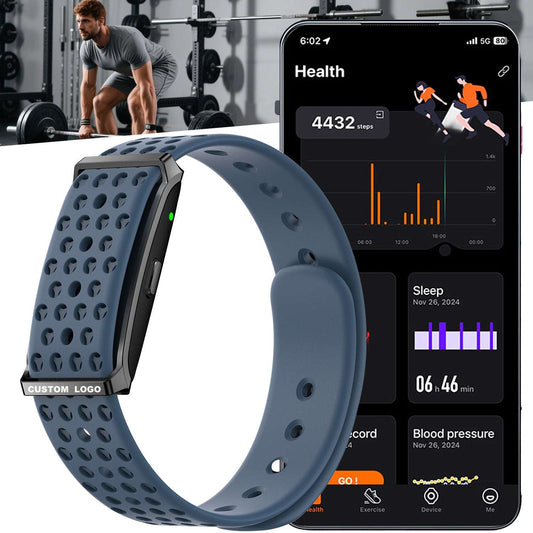
- “Your band is app-first. View health and activity dashboards inside the app.”
Also include what users can expect to see:
- daily dashboard
- sleep dashboard
- trend charts
- workout records
Section 5 — Charging Routine
Add two lines:
- “Charge with the included magnetic charger.”
- “Do not use the device while charging.”
This reduces a high-frequency support category.
Section 6 — Basic Care and Water Resistance Line
Use a simple channel-safe line:
- “Designed for daily wear water resistance.”
- “Avoid hot water, steam, and strong spray.”
Section 7 — Troubleshooting (Short)
Include only the top issues:
- not found in Bluetooth list
- pairing fails
- sync does not update
- notifications not showing
Each issue gets a short fix and a single “contact support” path.
Section 8 — Support Contact
Provide:
- email / WhatsApp / ticket link
- support hours if relevant
- device serial label location reference
4) Quick‑Start Card Copy (In‑Box Template)
A quick-start card should fit in one small card and still prevent the most common misunderstandings. Use a simple layout:
Front Side (Action Steps)
Title: “Get Started”
Step 1: “Scan QR code to open setup page.”
Step 2: “Install the app and pair your device.”
Step 3: “Wear daily and sync to view dashboards.”
App name line: “App: [APP NAME]”
OS line (optional if needed): “iOS [X]+ / Android [Y]+”
Back Side (Key Notes)
Screenless note (use when relevant):
“Screenless design. View health and sport data in the app.”
Charging note:
“Magnetic charging. Do not use while charging.”
Water care note:
“Designed for daily wear water resistance. Avoid hot water and strong spray.”
Health wording note:
“Health data is for wellness reference only.”
This card reduces the two most common corporate rollout problems:
- users don’t know where to view data
- users charge incorrectly or misunderstand daily-care behavior
5) FAQ Pack (Corporate Program Version)
A corporate program FAQ should be short, repeatable, and written for non-technical users. Below is a template you can reuse.
FAQ 1 — How do I pair the band?
Open the app, tap “Add Device,” select the model, and confirm the pairing request. Keep Bluetooth enabled during setup.
FAQ 2 — Where do I see my health data?
Your dashboards and records are shown in the app. Sync the device to update your charts and history.
FAQ 3 — I can’t find the device in the app.
Charge the device, keep it near your phone, turn Bluetooth on, and retry pairing inside the app.
FAQ 4 — The data is not updating.
Open the app, pull down to sync, and keep Bluetooth enabled. Trend charts update after syncing.
FAQ 5 — How often should I charge it?
Charge as needed based on your daily use routine. A consistent weekly routine is common in programs.
FAQ 6 — Can I wear it in daily routines involving water?
It is designed for daily wear water resistance. Avoid hot water, steam, and strong spray.
FAQ 7 — Should I wear it at night?
Yes. Sleep tracking and trends improve when the device is worn overnight.
FAQ 8 — Why are notifications not showing?
Enable notification permissions for the app in phone settings and keep Bluetooth connected.
FAQ 9 — Is this a medical device?
No. Health data is for wellness reference only.
FAQ 10 — Who do I contact for support?
Use the program support contact shown on the QR setup page.
6) What Makes This Kit Work in Multi‑SKU Programs
Corporate programs often deploy multiple SKUs across different groups. The kit stays effective when it uses a stable message layer that works for all SKUs:
- same QR setup page structure
- same pairing steps
- same “app-first dashboard” statement
- same charging safety line
- same care line
- same wellness reference statement
SKU differences can be communicated as simple feature highlights, but the onboarding routine should stay consistent.
7) Multi‑Language Rollouts: Keep the Kit Consistent
In bulk programs across multiple countries, onboarding issues multiply when translations are inconsistent. A stable approach is:
- one master English kit
- a controlled language set for the program
- the same QR page structure in each language
- the same quick-start card layout in each language
- the same FAQ questions in each language
This creates predictable training across offices and reduces “different instructions in different markets” support problems.
8) Program Success Metrics (What Buyers Usually Track)
Corporate buyers often track:
- activation rate (paired within 72 hours)
- first-week sync rate
- first-week overnight wear rate
- support ticket volume per 1,000 units
- return rate and “not as expected” feedback
The onboarding kit affects all of these directly because it controls first-week behavior.
9) What to Include in Your RFQ to Get the Onboarding Kit Ready
To prepare onboarding materials quickly, a corporate RFQ typically includes:
- target model(s)
- target country list and language list
- app name and download links to be shown
- support contact method (email/WhatsApp/ticket)
- packaging level (standard / retail / corporate kit)
- whether the program is screenless-first or includes LED/TFT bands
- deadline for rollout
Clear inputs produce faster onboarding deliverables and reduce iteration loops.
Certifications and Documentation (B2B Note)
Documentation and labeling requirements vary by destination country and channel policy. Program inserts and QR pages are typically aligned to the target market’s requirements.
FAQs
10 FAQs for Corporate Onboarding Kits (B2B)
-
Why use a QR setup page instead of only a manual?
A QR page is faster to update, easier to read on a phone, and reduces setup confusion. -
What is the most important line for screenless wearables?
“Screenless design. View data in the app.” -
What reduces support tickets the most?
Clear pairing steps, permission steps, and a short troubleshooting section. -
Should the quick-start card include charging safety?
Yes. “Do not use while charging” prevents common disputes. -
Do corporate programs need multi-language inserts?
Many do. Consistent translation reduces support load across regions. -
How long should the FAQ be?
Short. 8–12 questions typically cover most issues. -
Does onboarding affect wear compliance?
Yes. Users wear longer when the first-day routine is clear and simple. -
Can one onboarding kit support multiple SKUs?
Yes, when the pairing routine and app workflow stay consistent. -
Should the kit mention health disclaimers?
Yes. “Wellness reference only” is commonly used for health dashboards. -
Can the kit be packaged as a corporate gift set?
Yes. Packaging level can be aligned to corporate kit requirements.